
Community Management: How to Engage Your Audience and Build a Loyal Following That Drives Revenue
Community management is the art of turning followers into fans and fans into paying customers. It’s not just posting content — it’s the conversations, the responses, the engagement, and the relationship-building that happens between posts. Most businesses focus entirely on content creation and completely neglect community management. That’s like throwing a party and then hiding in the kitchen while your guests stand around wondering why nobody’s talking to them.
After managing social media for businesses across Orlando, I can tell you something that might surprise you: the businesses with the most engaged audiences aren’t necessarily the ones with the best content. They’re the ones that show up. They respond to comments quickly. They answer DMs personally. They participate in conversations on other people’s posts. They make their audience feel seen and heard. That engagement builds loyalty, and loyalty builds revenue.
Let me show you how to do community management right — in just 15 minutes a day.
From the auditor: Dennis Ocasio has delivered digital marketing for 200+ small businesses across Central Florida over 30+ years. Every recommendation here comes from tested, real-world client work — not theory.
What Community Management Actually Involves
Community management is everything that happens after you hit “publish” on a post. It includes:
- Responding to comments: Every comment on your posts gets a thoughtful reply — not a generic “Thanks!” but a real response that continues the conversation. Within 1-2 hours of posting, ideally within the first hour
- Answering DMs and messages: Private messages from prospects, customers, and followers get responded to the same day, ideally within the hour. Many of these are warm leads — people interested in your service but not ready to call. A fast, helpful response can be the nudge that converts them
- Managing reviews: Responding to every Google, Facebook, and Yelp review — positive and negative — within 24 hours. Your responses to reviews are read by hundreds of future customers
- Engaging proactively: Going to your target audience’s content and engaging with it. Leaving thoughtful comments on their posts. Liking their content. This isn’t optional — it’s how algorithms work. You have to give engagement to get engagement
- Monitoring brand mentions: Tracking when people mention your business name, tag you, or talk about you. Responding, thanking, sharing, and amplifying positive mentions. Addressing concerns in negative mentions before they escalate
- Facilitating conversations: Asking questions in your posts, running polls, creating discussion threads, hosting Q&As, and inviting audience participation. The best communities aren’t one-way broadcasts — they’re conversations
- Handling complaints publicly and professionally: When someone complains on your social media, how you respond publicly defines your brand. A professional, empathetic response can turn a complaint into a trust-building moment that impresses everyone watching
Why Community Management Directly Drives Revenue

Engagement isn’t a vanity metric when done right. Here’s how community management directly impacts your bottom line:
Algorithm Amplification
Every social media platform rewards engagement. Posts with more comments get shown to more people — the algorithm interprets engagement as a signal that the content is worth distributing. A post with 20 comments reaches 3-5x more people than a post with 2 comments, even with the same number of followers.
But here’s the trick: your own replies count as comments. If you get 10 comments and reply to all 10, that post now has 20 comments in the algorithm’s eyes. Your responses literally double your reach. Every reply you don’t send is organic reach you’re leaving on the table.
Trust Building
When potential customers see you actively responding to comments, answering questions, and handling reviews, they trust you more. It signals that you’re attentive, responsive, customer-focused, and real. In a world where most businesses feel faceless and automated, a personal response stands out.
I’ve had prospects tell me they hired us specifically because they saw how we interacted with people on social media. “You actually respond to everyone” was the exact phrase. That impression was worth thousands of dollars in lifetime customer value.
Customer Retention
Businesses that engage with customers on social media see 20-40% more repeat business than those that don’t. When customers feel valued — when you remember their name, acknowledge their comment, thank them for their review — they stick with you. The cost of keeping a customer is 5-7x less than acquiring a new one. Community management is retention marketing in its most natural form.
Word-of-Mouth Amplification
Engaged communities share your content and recommend you to friends. They tag you when someone asks for a recommendation. They screenshot your helpful response and share it with others. This organic word-of-mouth is the most trusted form of marketing — and it only happens when your community feels connected to you.
Direct Lead Generation
Some of the best leads come through social media interactions. Someone comments on your post, you have a conversation, they ask about your services, and you schedule a consultation. I’ve closed five-figure deals that started as a comment reply. These are warm leads with high trust because the relationship was built publicly before any sales conversation happened.
The 15-Minute Daily Community Management Routine
You don’t need to spend hours on community management. Here’s a daily routine that takes 15 minutes and delivers consistent results:
Minutes 1-3: Check and Respond to Your Post Comments
Look at your most recent posts on each platform. Reply to every new comment with something more than a generic response. If someone says “Great tip!” reply with “Thanks! Have you tried this approach yet?” or “Glad it resonated — which part are you going to try first?” A follow-up question keeps the conversation going and signals to the algorithm that there’s a real discussion happening.
Minutes 3-5: Check and Respond to DMs and Messages
Review your inbox on each platform. Respond to every message. For leads and inquiries, give a helpful answer and suggest a next step (call, consultation, link to your service page). For simple questions, answer directly. For spam, ignore and delete. Speed matters here — businesses that respond to social media messages within an hour are 7x more likely to qualify the lead.
Minutes 5-10: Proactive Engagement on Others’ Content
This is the most impactful step that most businesses skip entirely. Go to 5-10 posts from people in your target audience — potential clients, industry peers, local business owners, community group members — and leave genuine, thoughtful comments.
Not “Great post!” or a thumbs-up emoji. Real comments that add value: “I agree with point #3 — we’ve seen the same thing with our clients” or “This is a great breakdown. One thing I’d add is…” or “We struggled with this exact problem last year. What worked for us was…”
When your ideal clients see you consistently showing up in their feed with valuable comments, they start recognizing your name. They check out your profile. They see your content. Eventually, they follow you or reach out. This proactive engagement is the closest thing to cold outreach that doesn’t feel cold.
Minutes 10-12: Check Reviews
Check Google Business Profile and Facebook for new reviews. Respond to any new ones — positive or negative — within 24 hours. For positive reviews: “Thank you [name]! We loved working with you on [specific project]. Your recommendation means a lot.” For negative reviews: “I’m sorry about your experience, [name]. That’s not our standard. Can you DM me your details so I can make this right?”
Minutes 12-15: Check Mentions and Tags
Search for your business name and check your tagged photos/posts. Like, comment on, and share any positive mentions. If someone tagged you in a recommendation post, reply publicly: “Thank you for the shout-out! We appreciate your trust.” If someone mentioned you in a complaint, address it promptly and professionally.
Total time: 15 minutes per day. 75 minutes per week. That’s less time than most people spend scrolling their personal feed — and it directly generates business results.
How to Handle Negative Comments and Reviews Like a Pro
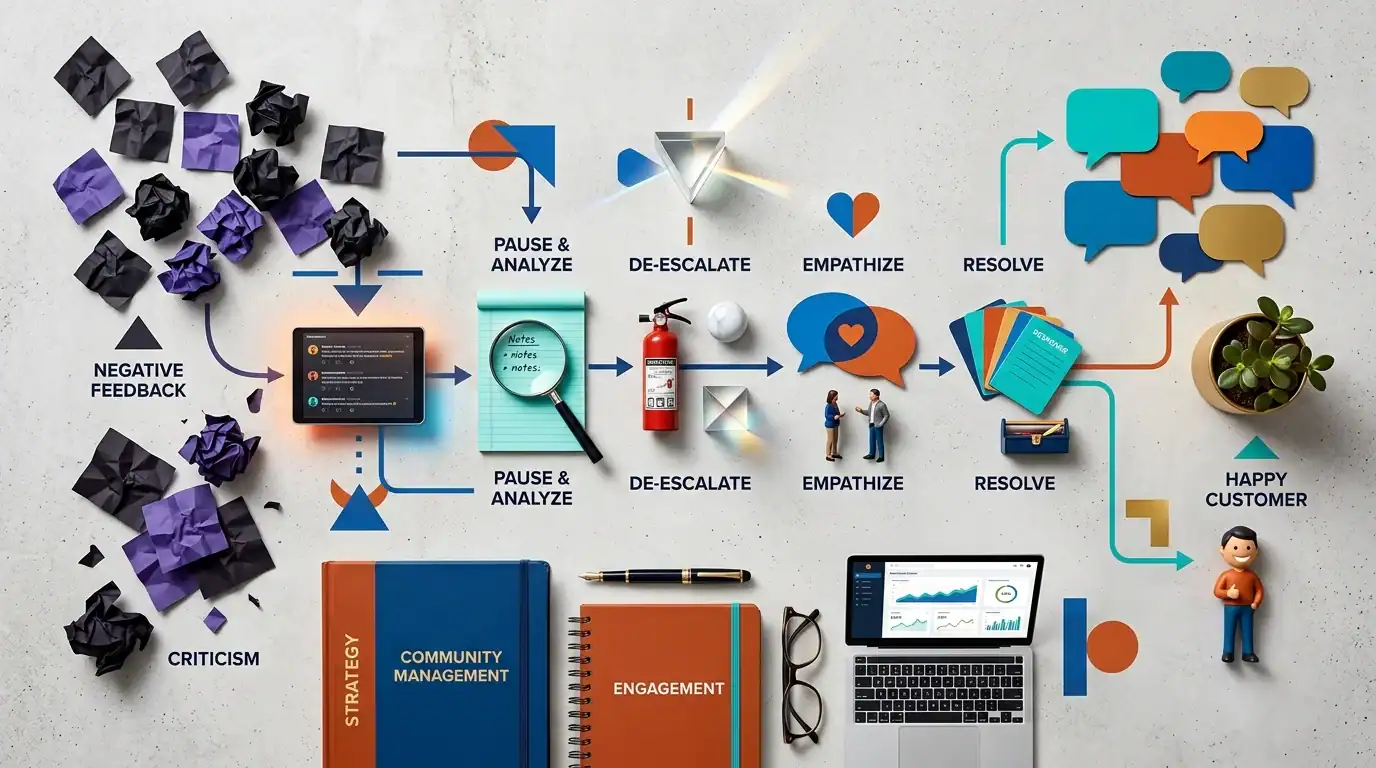
Negative feedback is inevitable. How you handle it defines your brand more than any marketing campaign:
Rule 1: Don’t Delete Negative Comments
Unless a comment is spam, abusive, or contains hate speech, leave it visible. People notice when comments disappear — it looks like you’re hiding something. The transparency of leaving negative feedback visible (and responding to it well) actually builds more trust than a page full of only positive comments.
Rule 2: Respond Quickly and Publicly
Acknowledge the issue publicly. Apologize sincerely — even if you disagree with the complaint. Show that you take feedback seriously. “I’m sorry about your experience, [name]. That’s not the standard we hold ourselves to. I want to make this right.”
Rule 3: Take the Details Private
After the public acknowledgment, move the conversation to DM, email, or phone to resolve the specifics. “Can you send me a DM with your project details? I want to look into this personally.” This shows the public that you’re taking action without airing the full dispute in the comments.
Rule 4: Follow Up
After resolving the issue, follow up with the person. Ask if they’re satisfied with the resolution. If they are, gently ask if they’d consider updating their review or adding a positive comment about the resolution. Many people are willing — and a “they fixed it and went above and beyond” follow-up review is incredibly powerful social proof.
The Hidden Audience
Remember: your response to a negative review isn’t just for the reviewer. It’s being read by every future customer who checks your reviews. A professional, empathetic response to a complaint tells prospective customers: “This business cares, takes responsibility, and goes out of their way to make things right.” That impression can be more valuable than 10 five-star reviews.
Community Management by Platform
Focus on comment responses, review management, and Facebook Group participation. Facebook Groups are where local community engagement happens — join 5-10 local groups and be consistently helpful. See our Facebook marketing guide for detailed group strategy.
Focus on Reel comments, Story replies, and DM conversations. Instagram’s algorithm heavily rewards engagement within the first hour of posting. Reply to comments fast. Use Stories engagement stickers (polls, questions, quizzes) to drive interaction. See our Instagram for Business guide.
Focus on thoughtful comment engagement on industry posts. LinkedIn rewards comments that add value to discussions. Spend 10 minutes per day commenting on 5-10 posts from your target audience. The algorithm will start showing your profile to more people in your industry. See our LinkedIn B2B guide.
Google Business Profile
Focus on review responses and Q&A management. Respond to every review within 24 hours. Monitor and answer questions in the Q&A section. Post weekly updates to keep your GBP active. See our GBP optimization guide.
Tools for Community Management

- Meta Business Suite (Free): Manages Facebook and Instagram messages, comments, and publishing from one dashboard. The unified inbox is essential for managing both platforms efficiently
- Hootsuite ($99+/month): Manages multiple platforms in one interface. Social listening features help you find brand mentions. Good for businesses active on 3+ platforms
- Sprout Social ($249+/month): The best-in-class tool for community management. Smart inbox combines all messages and comments across platforms. Sentiment analysis, response time tracking, and detailed engagement reports
- Google Business Profile Dashboard (Free): Monitor and respond to Google reviews, manage Q&A, and post updates directly
- Google Alerts (Free): Set up alerts for your business name to catch mentions across the web
For most small businesses, Meta Business Suite for Facebook/Instagram and the Google Business Profile dashboard cover 90% of community management needs — and they’re both free.
Measuring Community Management Success
Track these metrics monthly to gauge your community health:
- Response time: How quickly you respond to comments, DMs, and reviews. Target: under 2 hours for comments, under 1 hour for DMs, under 24 hours for reviews
- Response rate: What percentage of comments and messages you respond to. Target: 100%. Every comment. Every message
- Engagement rate: (Likes + comments + shares + saves) / reach x 100. A healthy engagement rate is 3-6% for small business pages. Above 6% means your community is highly active
- Sentiment: Are comments and messages mostly positive, neutral, or negative? Track this qualitatively by scanning your interactions weekly
- Leads from social: How many inquiries, messages, and calls come through your social platforms? Track in your CRM
- Review growth: How many new Google/Facebook reviews per month? Target: 5-10+ per month
Frequently Asked Questions

How quickly should I respond to social media comments?
Within 1-2 hours during business hours. For DMs from potential customers, within 1 hour. For Google reviews, within 24 hours. Speed signals that you’re attentive and professional. The faster you respond, the more engagement your post generates — and the more the algorithm shows it to others.
Should I respond to every single comment?
Yes. Even simple comments deserve a response — a thank you, a follow-up question, or an acknowledgment. This encourages more engagement (people comment again because they know you’ll respond), and it tells the platform’s algorithm that your content generates real conversation.
What if I get a fake negative review?
Respond professionally first: “We don’t have a record of your visit — could you share more details so we can look into this?” Then report the review to the platform as potentially fraudulent. Don’t accuse the reviewer of being fake publicly — let the platform investigate. Most platforms will remove reviews they determine are fraudulent.
How do I find time for community management?
15 minutes a day. Set a recurring calendar reminder. Make it non-negotiable, like checking your email. If you can scroll social media for 30 minutes personally, you can spend 15 minutes professionally. The ROI of those 15 minutes often exceeds hours of content creation.
Should I hire someone for community management?
If you genuinely can’t commit 15 minutes daily, yes. A community manager or a social media marketing agency can handle it. But be careful about outsourcing your voice — the best community management feels personal and authentic. Make sure whoever manages your community knows your business, your voice, and your customers well enough to respond as you would.
Does community management actually generate leads?
Yes. Both directly (people DM you, comment with questions, ask about services) and indirectly (increased engagement boosts your content reach, builds trust, and drives website traffic). The leads from community management tend to be high-quality because the prospect already has a relationship with your brand before reaching out.
Your Community Management Action Plan
- Today: Set a daily 15-minute calendar reminder for community management
- This week: Respond to every pending comment, DM, and review on all platforms. Start fresh
- Daily: Follow the 15-minute routine: respond to comments → answer DMs → engage on others’ content → check reviews → check mentions
- Monthly: Review your engagement rate, response time, and lead generation from social. Adjust your approach based on what’s working
- Quarterly: Evaluate whether to invest in community management tools or hire dedicated support as your audience grows
Next Steps

Want professional community management for your social media? Our social media marketing services include daily community management, comment response, review management, engagement strategy, and monthly performance reporting.
Schedule a free consultation or call (321) 300-4837.
Read more: Social Media ROI | Facebook Marketing | Instagram for Business
If this raised more questions than it answered, we’ve got answers to common Social Media questions in our FAQ — covering everything from pricing and timelines to what results actually look like. You can also read verified client reviews from businesses we’ve helped across Orlando and Central Florida.